
Book Entry
Book List
Customer Entry
Customer List
Customer Payments
Home Screen
Distributor Entry
Distributor List
Distributor Payments
Excel Import
Login Screen
Printer Configuration
Purchase Details
Purchase Entry
Purchase History
Purchase Return Details
Purchase Return Entry
Purchase Return History
Reports
Sale Details
POS (Sales Entry)
Sales History
Sales Return Details
Sales Return Entry
Sales Returns
Scanner
Settings Screen

Screen: Book Entry

Purpose

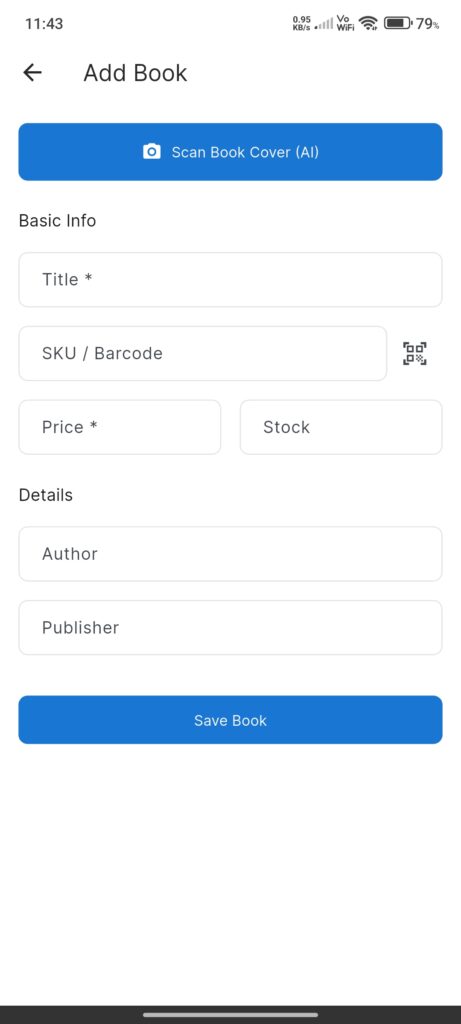
The Book Entry Screen allows users to add a new book or edit an existing one. It features AI-powered detail extraction from book covers.

Widgets

  • AI Scan Button: “Scan Book Cover (AI)” uses Gemini Vision to extract the book title from an image.
  • Form Fields:
  • Title: Book title (required).
  • SKU/Barcode: Button to scan barcode or auto-generate (if empty).
  • Price: Selling price (required).
  • Stock: Current quantity.
  • Author: Author name.
  • Publisher: Publisher name.
  • Header Actions: Delete button (if editing existing book).

Interactions

  • Scan Cover (AI): Captures image -> calls AI Service -> populates Title.
  • Scan Barcode: Fills SKU field from camera scan.
  • Save: Validates and saves record (Add or Update).
  • Delete: Removes book from inventory (confirmation required)
Screenshots

Book Entry
Book List
Customer Entry
Customer List
Customer Payments
Home Screen
Distributor Entry
Distributor List
Distributor Payments
Excel Import
Login Screen
Printer Configuration
Purchase Details
Purchase Entry
Purchase History
Purchase Return Details
Purchase Return Entry
Purchase Return History
Reports
Sale Details
POS (Sales Entry)
Sales History
Sales Return Details
Sales Return Entry
Sales Returns
Scanner
Settings Screen