
Book Entry
Book List
Customer Entry
Customer List
Customer Payments
Home Screen
Distributor Entry
Distributor List
Distributor Payments
Excel Import
Login Screen
Printer Configuration
Purchase Details
Purchase Entry
Purchase History
Purchase Return Details
Purchase Return Entry
Purchase Return History
Reports
Sale Details
POS (Sales Entry)
Sales History
Sales Return Details
Sales Return Entry
Sales Returns
Scanner
Settings Screen

Screen: Book List

Purpose

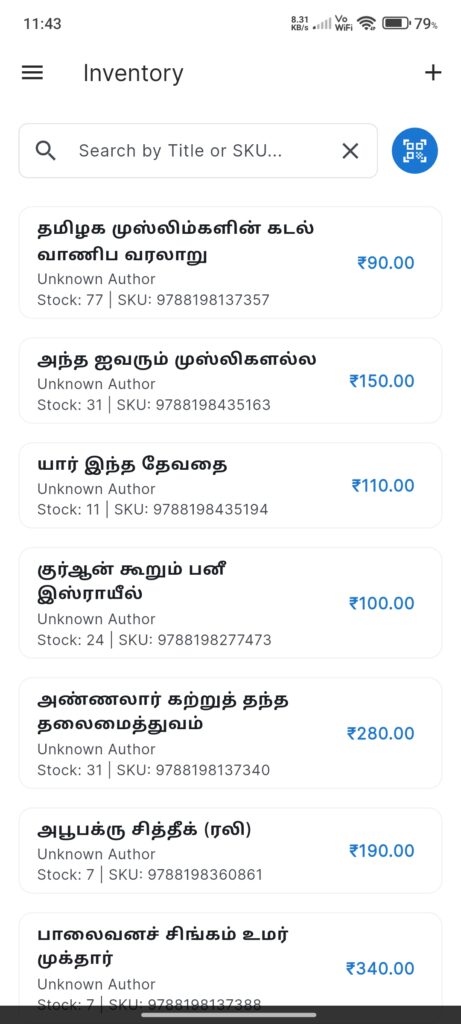
The Inventory Screen manages the catalog of books available in the shop. It allows searching, scanning, and managing book details.

Widgets

  • Search Bar: Search books by Title or SKU.
  • Scan Button: Quick access to barcode scanner.
  • Book List: Cards displaying:
  • Title & Author.
  • Stock Quantity & SKU.
  • Price (in accent color).
  • Add FAB: Floating button to add a new book manually.

Interactions

  • Tap Book: Opens `AddEditBookScreen` to edit details.
  • Scan Barcode: Scans a book’s barcode to finding it or prompting to add it (via `AddEditBookScreen` pre-filled).
  • Search: Real-time filtering of the book list.
Screenshots

Book Entry
Book List
Customer Entry
Customer List
Customer Payments
Home Screen
Distributor Entry
Distributor List
Distributor Payments
Excel Import
Login Screen
Printer Configuration
Purchase Details
Purchase Entry
Purchase History
Purchase Return Details
Purchase Return Entry
Purchase Return History
Reports
Sale Details
POS (Sales Entry)
Sales History
Sales Return Details
Sales Return Entry
Sales Returns
Scanner
Settings Screen