Purpose
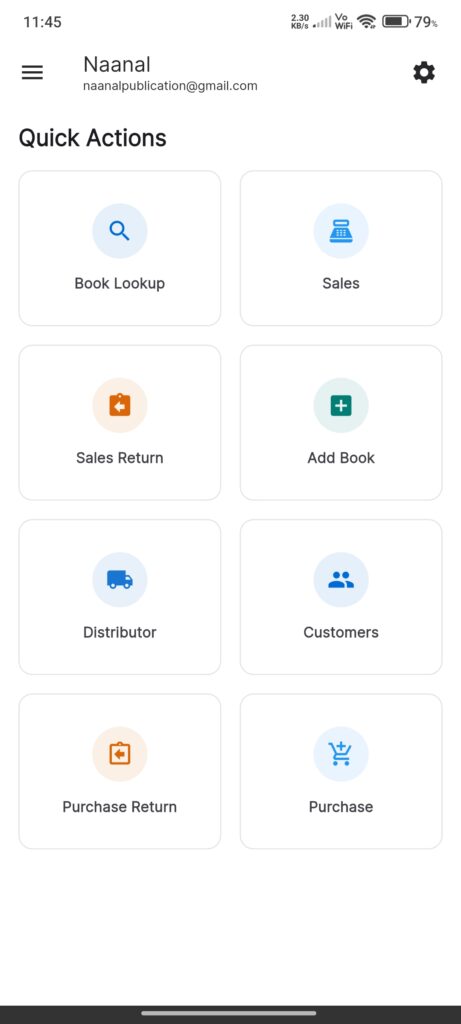
The Home Screen functions as the central dashboard. It provides quick access to frequently used features (“Quick Actions”) and displays real-time inventory intelligence stats.
Widgets
AppBar
- Shop Name: Displays the name of the logged-in shop (or “Home”).
- Settings Icon: Navigates to the application settings.
Side Drawer
- AppDrawer: Accessible via the menu icon (or side swipe), providing navigation to all app sections.
Quick Actions Grid
A grid of cards for common tasks:
- Book Lookup: Search and view inventory.
- Sales: Open the Point of Sale (POS) interface.
- Sales Return: Process a return from a customer.
- Add Book: Add a new item to inventory.
- Distributor: Manage distributors.
- Customers: Manage customer records.
- Purchase Return: Process a return to a distributor.
- Purchase: Record new stock purchases.
Inventory Intelligence
A section displaying key performance indicators (KPIs) and status widgets:
- Low Stock Books: Displays items running low on stock.
- Top Selling Books: Shows best-performing items.
- Dead Stock Books: Highlights items that are not moving.
Interactions
- Navigation: Tapping any Quick Action card navigates to the corresponding screen.
- Settings: Tapping the Settings icon opens the `SettingsScreen`.
- Refresh: Pulling down on the screen triggers a refresh of all data (Sales, Books, Distributors, Customers, Settings).
- Drawer: Opening the drawer allows navigation to other parts of the app not listed in Quick Actions.