Book Entry
Book List
Customer Entry
Customer List
Customer Payments
Home Screen
Distributor Entry
Distributor List
Distributor Payments
Excel Import
Login Screen
Printer Configuration
Purchase Details
Purchase Entry
Purchase History
Purchase Return Details
Purchase Return Entry
Purchase Return History
Reports
Sale Details
POS (Sales Entry)
Sales History
Sales Return Details
Sales Return Entry
Sales Returns
Scanner
Settings Screen

Screen: Purchase Details

Purpose

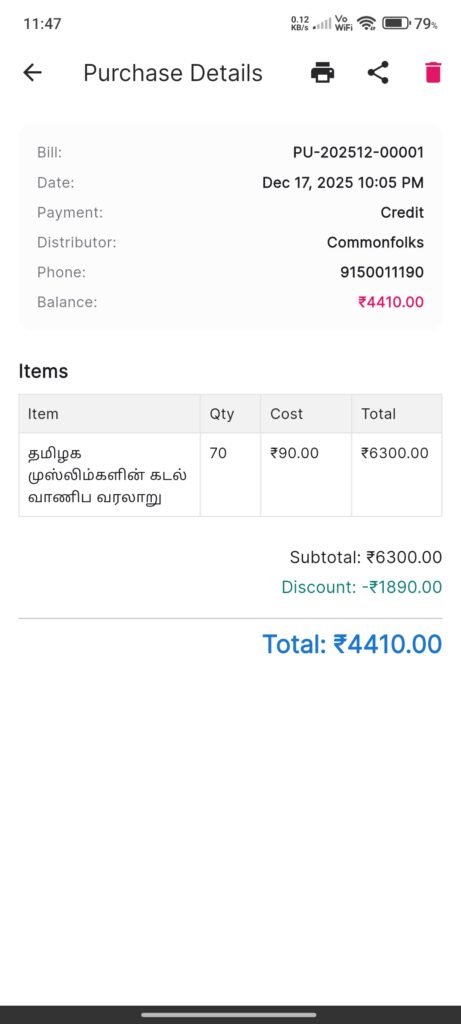
The Purchase Details Screen displays full information about a specific purchase transaction.

Widgets

  • Header Info: Bill Number, Date, Payment Method.
  • Distributor Info: Name, Phone, and Current Balance.
  • Items Table: List of books purchased with Quantity, Cost, and Total.
  • Financials: Subtotal, Discount, and Final Total.
  • Action Buttons (AppBar):
  • Print: Print thermal receipt.
  • Share: Share via WhatsApp.
  • Delete: Revert transaction (updates stock and balance).

Interactions

  • Print: Triggers the print job to the default printer.
  • Share: Generates a text summary and opens WhatsApp.
  • Delete:
  • Checks if any returns exist for this purchase.
  • If Returns Exist: Blocks delete and offers to open the Return record.
  • If Safe: Prompts for confirmation and deletes record.
Screenshots

Book Entry
Book List
Customer Entry
Customer List
Customer Payments
Home Screen
Distributor Entry
Distributor List
Distributor Payments
Excel Import
Login Screen
Printer Configuration
Purchase Details
Purchase Entry
Purchase History
Purchase Return Details
Purchase Return Entry
Purchase Return History
Reports
Sale Details
POS (Sales Entry)
Sales History
Sales Return Details
Sales Return Entry
Sales Returns
Scanner
Settings Screen