Purpose
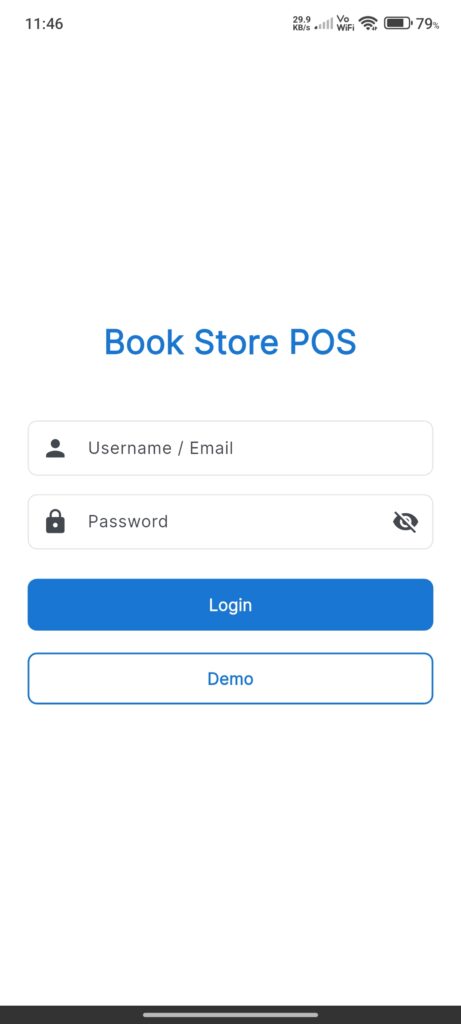
The Login Screen allows users to authenticate into the application. It provides standard credential-based login as well as a “Demo” mode for trial access.
Widgets
- App Title: “Book Store POS” display at the top.
- Username / Email Input: A text field for entering the user’s identifier.
- Password Input: A text field for entering the password.
- Visibility Toggle: An eye icon to toggle password visibility (obscure/reveal).
- Login Button: A primary button to submit credentials. Shows a loading spinner while processing.
- Demo Button: An outlined secondary button to log in using a demo account.
Interactions
- Enter Credentials: properties `Username` and `Password` inputs.
- Toggle Password: Tap the eye icon in the password field to show or hide the password characters.
- Login:
- Tap Login.
- The app validates that fields are not empty.
- It attempts to authenticate with the backend.
- Success: Navigates to the `HomeScreen`.
- Failure: Displays an error snackbar or a purchase required dialog if applicable.
- Demo Mode:
- Tap Demo.
- Attempts to login with demo credentials.
- Success: Navigates to the `HomeScreen`.