Purpose
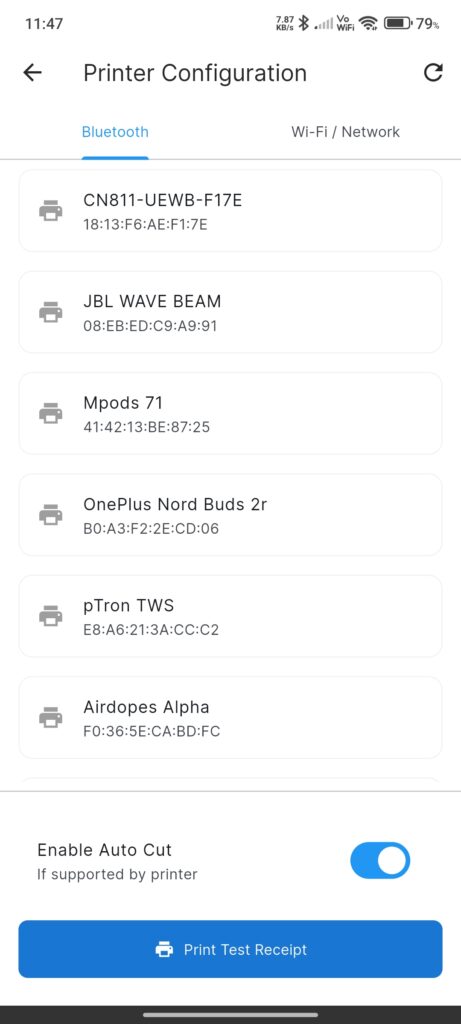
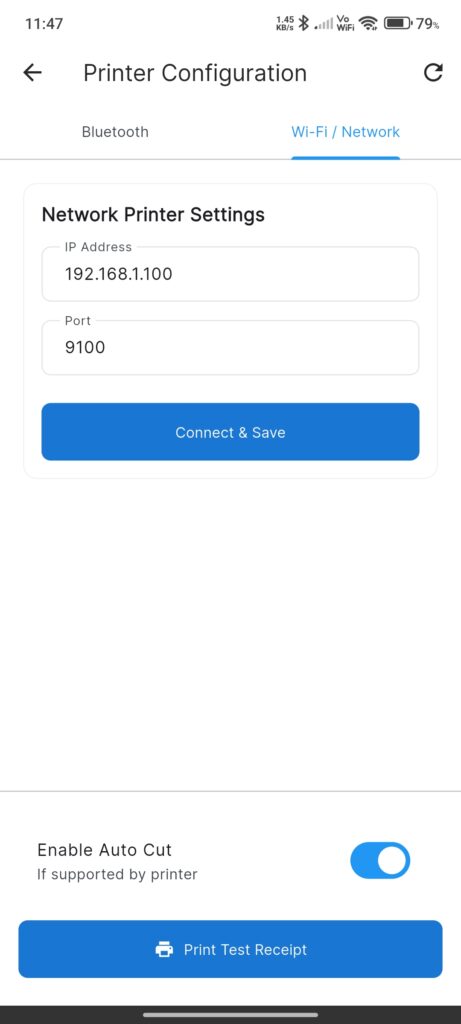
The Printer Configuration Screen manages connections to external thermal printers via Bluetooth or Network (WiFi/LAN).
Widgets
Tab Bar
- Bluetooth: For connecting to paired Bluetooth printers.
- Wi-Fi / Network: For connecting to IP-based printers.
Bluetooth Tab
- Device List: Lists bonded Bluetooth devices.
- Icons indicate connection status (Selected vs Connected).
- Refresh Button: Scans for paired devices again.
- Status Overlay: Shows “No bonded devices found” if empty.
Network Tab
- IP Address Input: Field to enter the printer’s static IP (e.g., `192.168.1.100`).
- Port Input: Field to enter the port (default `9100`).
- Connect & Save Button: Attempts connection and saves settings.
Common Footer
- Enable Auto Cut: Toggle to send cut commands after printing.
- Print Test Receipt: Button to print a sample ticket to verify connection.
Interactions
- Switch Interface: Tap tabs to switch between Bluetooth and Network modes.
- Connect Bluetooth: Tap a device in the list.
- The app attempts to connect.
- Status updates to “Connected”.
- Connect Network: Enter IP/Port and tap Connect & Save.
- Test Print: Tap Print Test Receipt to validate the link.