Purpose
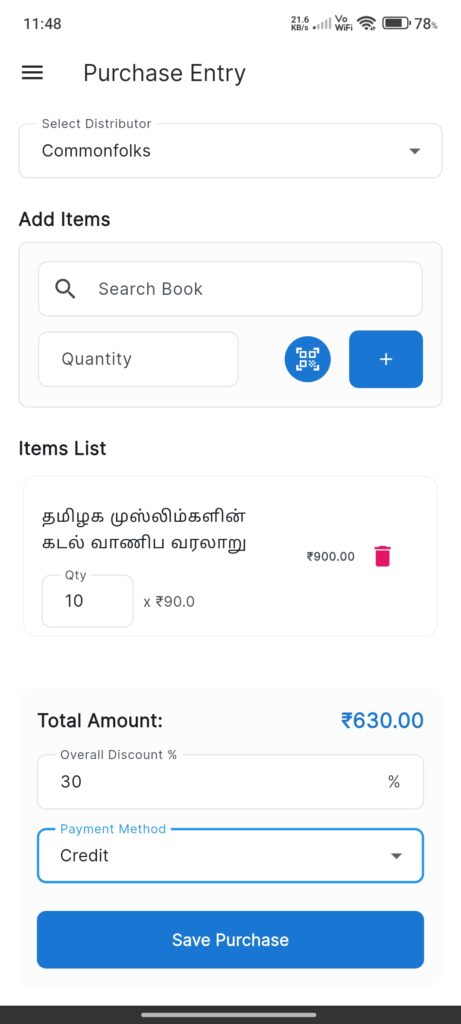
The Purchase Entry Screen allows the user to record new stock inventories from distributors.
Widgets
- Distributor Dropdown: Select the source distributor.
- Add Items Section:
- Search Book: Type to search book by title or SKU.
- Quantity: Input number of units.
- Barcode Scanner: Button to open scanner for quick book lookup.
- Add Button: Adds the configured item to the cart.
- Items List: Displays added items with editable quantity and delete option.
- Footer:
- Total Amount: Auto-calculated sum.
- Overall Discount %: Apply a discount to the entire bill.
- Payment Method: Dropdown (Cash, Credit, etc.).
- Save Purchase Button: Commits the transaction.
Interactions
- Select Distributor: Required field.
- Add Item:
- Search text or scan barcode.
- Enter quantity.
- Tap Add.
- Edit List:
- Change quantity in the list input.
- Tap Delete icon to remove.
- Finalize:
- Enter any overall discount.
- Select payment method.
- Tap Save Purchase.
- Post-Save:
- A success dialog appears.
- Options to Print receipt or Share on WhatsApp.